Thursday, September 2, 2010

BB9: Top Ten Responses to the New Look


We're up! A new year at ASU and we've moved to BB9. After 2 weeks of crash and burn, the system seems stable. New instructors are signing up for workshops, searching the Blackboard site for startup guides, taking training classes and asking for help.
Experienced instructors, aren't quite as prepared. They left campus in the Spring with their course copy requests submitted and now, thinking all is right with the world, are once again attempting to get into their BB8 shells. And guess what? They're stumped. Something familiar was taken away and now they're strangers in a strange, oddly familiar and yet mysterious land.

So, based on the 50+ email messages and 12 angry phone calls left for me in the last 48 hours, I appealed to the instructional designers of ASU to compile a quick Top 10 list of BB9 queries. The Training Group at our ASU University Technology Office came through, kindly including a number of suggestions from the faculty of CoPP, adding some they've heard (very helpful, as I hadn't heard those yet...or discovered the solutions) and here you have the collective hive-mind confusion made less confusing. Check it out!


And in case you haven't seen their most excellent Blackboard 9 Instructor Help Site, please check that out too. A wealth of resources, tips, answers, ideas. Again, BB9 is admittedly not the most intuitive interface, and ASU got off to a rocky start, but BB9 is here to stay and has a lot under the hood. Visit the help sites, explore, get over our collective crankiness and use technology effectively to make teaching and learning an engaging, meaningful experience. Cuz that's why we're here. Have a great semester!

Wednesday, September 1, 2010

BB9 Redux: Posting Video links

Beginning of semester and ASU goes live with Blackboard Learn. Most faculty here will readily tell you this is a misnomer at our site as it's been down a good deal of the time since the semester started two weeks ago. But let's put that aside and talk about how very different BB9 is and how a few aspects are seemingly not possible in BB9 that were simple in previous versions. This is not to negate a few exciting new features, but focusing today on VIDEO. Especially the desire to stay within the BB environ while watching the video. It used to be rather straightforward to 'Create Item' and choose 'Display media file within the page'. But that was then, and this is BB 9. (ASU tells me that BB wants us to call it BB Learn. Really? I'll call it BB Learn if/when it actually functions at ASU and we can use it to teach/learn. Fair?).

Display media file within the page: Well you can choose that item forever, and it doesn't seem to embed video. Not the way it used to work. So, depending on the type of video link you're attempting to post, your options will now be different. I note that YouTube embed code works, but only because the Blackboard site states they optimized for YouTube and a few other commercial sites. Embed code doesn't work for sites we often use at ASU (like Films on Demand), but we'll get to that in a minute.

For YouTube users wanting to embed inside your course, preserving navigation bar (old look):
you still Create Item, but now you click on html button in the toolbar, and post the YouTube-provided source code. (How to find the embed code at a YouTube site shown here: click on embed button under the video at YouTube and copy source code that appears).

At the BB site, you then click on the html button on the Create Item toolbar, and paste your code. You now have an embedded video just the way you'd expect it to look.

Most other sites, because they're not optimized by BB to work, won't work with html embed code, no matter how carefully you write the code. I tried. Give up. Here's the work-around that isn't the same, as the learner does loose the left navigation back to class content, but allows you to keep the learner in the course framework with navigation back to home page for course at the TOP of the page.

To embed video link in your course you use a full frame embed:
Build menu, create external link.
Copy the link, choose CREATE EXTERNAL LINK.
(You can of course do this with YouTube as well, IF you want only top navigation).

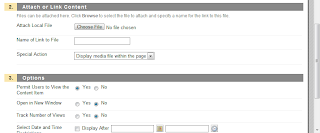
Paste your link, Choose "Display media file within the page." (Feature works in this setting).
Remember to choose "Open in New Window"=NO if you want to embed in course window.
Here's a pic of these two choices on the Create External Link object page.

So, things change. Nothing remains the same. Mostly, we don't like change but in the end we adapt. That's what we do. Happy adapting. When things settle down, we'll talk about the worthy new features in BB9.

Wednesday, August 4, 2010

Blackboard 9, Fall Semester and ASU Tidbits


Sometimes, when you least expect it, technology actually works. Too busy to drive to the ASU Tempe campus for the Blackboard Course Administrators Fall 2010 startup meeting, but the technology walked its talk this time by making session available via Adobe Connect. We have this virtual meeting software available as a site license here at ASU for just these multi-campus events, and we hardly ever use it for IT gatherings. It would be like the beautician having nice hair or the plumber having time to fix her own leaky faucet.

But use it we did and had a great session, reviewing the full-scale implementation of BB Learn/9 here, as well as the full-scale release of hosting BB off-site at Blackboard. Fingers crossed, wish us luck.

Here's some information that instructors will find useful as we move forward:
The name: BB Learn/9. It's version 9, the one after 8, but stylish people are calling it Learn to mitigate reality that it's still just a course management system, not a learning environment. A rose is a rose, but feel free to call it an orchid.

BB9looks very different, and some helpful navigation to the new look has been provided by UTO at What's New in BB 9.

For support files once we get past new features and BB9 startup, the official BB 9 Guide site is also online.

Reminder: If you haven’t requested your Fall courses, the ‘Blackboard Course Request’link is at my.asu.edu and right now, courses are being created within hours. This will slow to a day or so at the beginning of the semester, when requests are in the 1,000s.

If you prefer live encounters when seeking help, I’ll be in my office (UCent 413) all day August 19-20, reserving the time for BB support, questions, and sharing ideas. Stop by/call/Skype/Google chat/or Tweet me!

Quick tips on BB9?
  • The Digital Dropbox is gone. Use ‘create assignment’ for student submissions
  • There is a new “Edit mode” button on top right that allows you to toggle between instructor/course edit view and student view.
  • The Control Panel is now a part of the Navigation panel on left, with all the links bundled by topic. Click the Evaluation arrows to find Grade Center. Click the Customization arrows to find tools and change course look.
  • All the menus are now context-sensitive, available from the pull down chevron next to their names.

Have a great semester!

Monday, August 2, 2010

Change is Painful

As a new semester approaches, some of my favorite faculty are still making claim that they are so good at teaching, they don't need to use technology. Ironically, some are making this claim on a FaceBook conversation I've been following. FB posts are much too short for me to join in with much hope of changing minds, but I'm weighing in here not on 'technology' but on serving our learners.

Perhaps it is true that F2F, low-tech faculty can be very good at years of practiced lecture, buuuuuttttt....there is so much evidence that today's students aren't like the faculty, aren't oral learners, don't learn enough from being lectured at, and that one would hope that change, despite being painful, could still be possible if we note that they are not us. Today's students are often here because they need to be here. They don't love school, they just want the opportunity to climb into the middle class and increasing evidence (like the recently released Tough Choices, Tough Times) says that we now need higher education to get us there.

Michael Wesch tells a story of asking his lower-division students to raise their hands if they liked their classes. Only a few tentatively did. He then asked how many of them liked to learn. They all raised their hands.

There is only so much institutional support services can do to make it easier for "non-traditional" students (now the majority) to succeed. There has to be some effort made it the classroom but ...what? It's hard? Tenure says you don't have to change? Research time is more important than learning to change? Students are captive, submissive, 'tell me what to do to get out of here' voices with no power to ask for change? What stops faculty from making the effort?

A friend of mine uses analogy of the medical community, saying doctors refused to listen to a call for change. And then the HMOs came in and changed them. If society can come for MDs in the morning, you can bet they'll be at our doors by night.
They're here. In the form of for-profits, government commissions, outraged calls for accountability, budget cuts, and increasing evidence that we're not graduating prepared citizens.

I'm not saying we can't do the job without technology. I am suggesting that we can't do the job without engaging the learners we now have in our courses. By all tools possible. The image above suggests we're not even trying. (NO, just using Blackboard doesn't count. It's a course management system!)

Common wisdom (ok, my therapist) says that 'we don't change until the pain of change becomes less than the pain of staying the same'. I'm thinking we're close to that change point.

If you have ideas on how to get there from here, the Next Generation Learning Challenges Initiative will soon be releasing their RFPs to support projects that reach out to NG students with NG ideas and technologies. No pain, no gain.

Thursday, July 29, 2010

3 Before Me!

"Online Teaching: If it's more work, you're doing it wrong!"

I'm taking this workshop to the streets this month, spreading faculty-contributed best practices far and wee, by any means possible. No better time to shout practice from the digital rooftops. August is upon us and we're all beginning to crank up the dusty LMS shells for Fall semester here at ASU. During busiest course development times, seems it never hurts to remind our teaching community of the obvious. So, let's be obvious for a moment:

It's all, and always, about the learning. We know that. But what is the quality of learning, long term, when the instructor is spread so thin, s/he is cracking into tiny bits? Class sizes are increasing, students are less self-directed, and research demands are omnipresent. Plus, we're increasingly facing 24-hour connectivity and 'online teaching' is now a misnomer. Fact: MOST of the faculty at ASU request a Blackboard container. MOST of the faculty are making more materials and communication options accessible online. Many are teaching hybrid (reduced seat time) courses, and quite a few have leaped into completely online offerings. How you do this makes a difference, and I have at least 10 Best Practices to share, but for now let's dive into my new favorite: 3 Before Me!

What does it mean? It means you stop answering simple questions via email over and over in the mistaken belief that this somehow facilitates better learning. It doesn't. Not really. It encourages laziness and continuation of the misguided notion that you're the only source for knowledge. There are other options, including your own materials, and your BB shell. Email should be reserved for personal, not course, correspondence.

I picked up "3 Before Me" from my colleague, Marc Van Horne, over at ASUOnline, and he's right, for 100 reasons. The most important, from the point of view of faculty support is that technology is a black hole of time and energy and your first line of protection is establishing good practice. 3 Before Me is one of the best of these practices. Protect your energy from small, low ROI, repetitive interrruptions. The second reason is that you're requesting self-reliant behavior from your students and this is a great gift to give.

Try it: set a rule, from the first moment, repeated in many places (syllabus, code of contact, first announcement, whenever rule is broken, etc) that the learner must go to 3, yes THREE, that's III, at least 1-2-3 other sources before coming to you with a digital question. I think this is great rule for F2F teaching as well, modeling responsibility/ownership/self-reliance/ thoughtfulness/ respect for others shouldn't be unique to online behavior...but we won't go there. F2F, instructors love to see that adoring, empty, attention-questing gaze in young eyes and in the classroom, the same, adoring question only gets asked once per class. So, let's just stick to protecting your time and energy digitally, where time and energy matter so easily disappear into an online black hole.

So, what are the magic 3?
  1. The syllabus. 80% of the answers are usually there.
  2. The course discussion board. Create an FAQ forum for quotidian questions. (When is the assignment due, where do I post my response, how many pts for this quiz, how long a post is expected, where do I find the reading...). Other learners often know the answer and may be online earlier and more often than you. This also models a learner community of practice that serves well in the academic discussions and collaborative work.
  3. The technical Help Desk. (At ASU, this is 480-965-4800). You're not the best source of tech support and you shouldn't need to figure out why Janey can't open a PDF while running Window XP and Google Chrome on a Dell Notebook. Leave these questions to people who enjoy answering them.
Here's bottom line: if one student has a question or problem, many others may have the same. Don't answer the same questions over and over, don't create a script for those questions that you open/copy/paste over and over, and don't try to solve questions that aren't your area of expertise (computer problems). Your kindness should not be killing you.

3 Before Me: teaching self-reliance and personal responsibility by sending students in a direction that allows them to look for answers in reliable places, places you've created, places where you've already posted the answers. Give yourself the gift of time and your students the gift of independent inquiry. You'll both be the better for it.

Wednesday, June 23, 2010

A Brand New Lyterasy?


A changing world we live in, and those in higher education seem to be running faster and faster while barely keeping up. Seems Cornell is thinking deeply about this new digital literacy realm and digging into making explicit the tricky new definitions and student understanding of academic integrity, internet research, privacy and reputation, and new modes of technology applied to teaching and learning.

Their Digital Literacy Resource site rocks and should be a required site for those thinking about teaching undergraduates anywhere. A great site and a great effort by Cornell at change management, deep thinking, transformational practice.

Thursday, June 17, 2010

Blackboard 9 Redux


It's taking time for the word to get out, but by now most instructors at ASU are discovering that the Drop Box is gone in BB9. Yeay! Hurray! It's about time. We hated the DropBox. It was ugly, clumsy, inelegant and stupid. The Assignment feature is much better, as it automatically integrates with the Grade Center (GC) and allows us to view individual contributions from that student's cell, or to download all submitted contributions for that assignment as a zip file.
More on Assignment feature (creating, using, grading)

Now, everything elegant has a quirk or two, and many are discovering that this is true with the Assignment feature. Namely, that you go to download from the GC and the screen seems to freeze, blow up, or give you an error message. Why, you ask? (After swearing, kicking your PC, or waiting for hours for a response from Help Desk).
Because you broke the old file naming convention rule. Sometimes, one forgets that new Web apps are still a part of the old world of files and commands and naming conventions.

Spaces. Periods. Funky symbols. Hash marks. Don't do that. So what if you forget that age-old rule? Rename the assignment. DO NOT rename the column in the Grade Center, rename the assignment itself. The problem should go away.

So, a bite-size recap of golden rules for happy computing with BB:
#1. If something seems broken, try another browser.
#2. If that doesn't fix it, remember to only use computer-friendly naming conventions for files, or for objects that will turn into files.